


An SEO audit report is only useful if you know what each section means, which findings to act on first, and which numbers tell you something actionable versus which ones are just noise. A report that generates 200 findings and leaves you to figure out what matters is not more useful than one that generates 20 findings - it is often less useful, because the genuine priorities get buried under issues that will not meaningfully affect rankings or AI visibility.
This guide walks through the 12 sections of a complete modern SEO audit report - the kind generated by AI Rank Lab's free SEO audit tool - and explains what each section measures, how to interpret findings, and what the fastest-impact fixes look like for each. Each section ends with a concise checklist.
Before You Start: How to Approach Any Audit Report
Two principles that should govern how you read any SEO audit report:
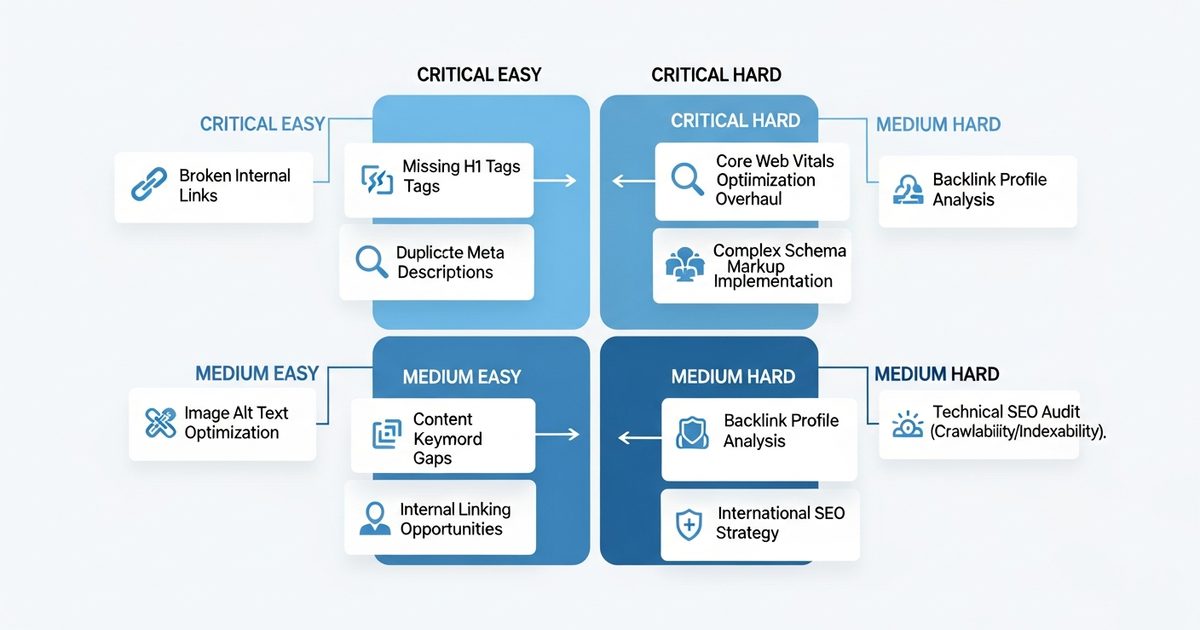
Impact-to-effort ratio is more important than severity alone. A Critical finding that takes 40 hours to fix delivers less value in the next 30 days than a High finding that takes 20 minutes to fix. Sort your action list by how much ranking or citation rate improvement each fix is expected to deliver per hour of implementation time - not by which findings have the reddest icon.
A 2026 audit report covers three channels, not one. Older audit reports covered only Google-facing SEO signals. A complete modern audit includes AEO signals (AI crawler access, schema quality for ChatGPT and Claude citation) and GEO signals (llms.txt, generative engine readiness). Findings in the AEO and GEO sections are as actionable as technical SEO findings - and often faster to fix.
Section 1: Overall Score and Executive Summary
The overall SEO health score (typically 0-100) is a weighted composite of all signals checked. Use it as a benchmark, not a target. What matters is: what is your score relative to your top competitors, and how is it trending over time?
A score of 72 that is improving by 5 points per month is a better situation than a score of 80 that is flat. Run audits at consistent intervals (monthly or after each fix batch) and track the score trend rather than fixating on any single data point.
The executive summary's three headline findings - the highest-impact critical issue in each major category - are the right starting point for prioritization conversations with clients or developers. Use these three as your opening framing, not the full 200-item findings list.
Checklist: Overall score
Note your overall score as a baseline
Check your category sub-scores (Technical, On-Page, Schema, AEO) separately
Identify which category has the lowest score - that is usually where the highest-leverage work is
Schedule a re-audit date 4-6 weeks out to measure improvement
Section 2: Core Web Vitals
Core Web Vitals - Largest Contentful Paint (LCP), First Input Delay (FID), and Cumulative Layout Shift (CLS) - are a confirmed Google ranking factor and a proxy for user experience quality that also influences LLM citation confidence.
LCP measures how long the largest visible element takes to load. Under 2.5 seconds is Good. 2.5-4 seconds is Needs Improvement. Above 4 seconds is Poor. The most common cause is large unoptimized images - typically fixable by compressing hero images and converting to WebP format.
FID (now being replaced by INP - Interaction to Next Paint) measures responsiveness to user interaction. Poor FID is almost always caused by heavy JavaScript blocking the main thread. The audit should identify which scripts are responsible.
CLS measures visual stability - how much page elements shift after initial load. Common cause: images without defined dimensions, late-loading fonts, or dynamically injected content. Usually fixable by adding explicit width and height to images.
Checklist: Core Web Vitals
Check LCP - if above 2.5s, identify the largest element and its file size
Check CLS - if above 0.1, look for images missing width/height attributes
Check whether Core Web Vitals issues affect your key landing pages specifically (not just the homepage)
Test on mobile separately - mobile scores are typically worse and weighted for mobile-first indexing
Section 3: Technical SEO - Crawlability
This section covers whether search engines - and AI crawlers - can access and index your content correctly. Crawlability issues are the highest-severity technical findings because they affect the performance of all other optimization work.
Read the robots.txt findings carefully. A Disallow: / rule affecting all crawlers (wildcard block) or specific important sections of your site is a critical finding. In a 2026 audit report, this section should also show the status of AI-specific crawlers: GPTBot, ClaudeBot, PerplexityBot, and Google-Extended. A blocked AI crawler is a critical finding regardless of your site's overall technical health.
The sitemap section checks whether your XML sitemap is present, linked in robots.txt, free of errors, and submitted to Google Search Console. A sitemap with 404 URLs or pages blocked in robots.txt confuses crawlers and dilutes your crawl budget.
Checklist: Crawlability
Verify robots.txt allows Googlebot, GPTBot, ClaudeBot, and PerplexityBot
Check sitemap is present at /sitemap.xml and free of errors
Verify no important pages are blocked by robots.txt (check your product and key content pages specifically)
Check redirect chains - more than one redirect hop for any important URL wastes crawl budget
Section 4: Technical SEO - Site Health
This section covers SSL/HTTPS, broken links, response codes, and URL structure. Most of these are baseline requirements rather than optimization opportunities - getting them right protects your existing rankings rather than creating new ones.
Broken links (404s) on your site hurt user experience and waste crawl budget. The audit should list the specific broken URLs and the pages linking to them - fix by updating the link to the correct destination or redirecting the 404 URL. Broken links to external sites are less critical but worth cleaning up in bulk when found in large numbers.
HTTPS is a ranking signal and a trust indicator. A site without valid SSL or with mixed content (HTTP resources on HTTPS pages) should treat this as critical regardless of other findings.
Checklist: Site health
Confirm HTTPS is active with no mixed content warnings
Fix any broken internal links (4xx responses)
Check for canonical tag presence on pages with potential duplicate content
Verify URL structure is clean - no session IDs, tracking parameters, or excessive URL parameters in indexed URLs
Section 5: On-Page SEO - Title Tags and Meta Descriptions
Title tags are the single most directly controllable on-page ranking signal. Every indexed page should have a unique title tag between 50-60 characters that includes the primary keyword for that page. Title tags over 60 characters get truncated in search results, which reduces click-through rates.
Meta descriptions do not directly affect rankings but significantly affect click-through rate from search results. They should be 140-160 characters, include the primary keyword naturally, and give users a specific reason to click rather than a generic description of the page topic.
The audit should list every page with a missing, duplicate, or out-of-range title tag or meta description. These are typically Easy/High fixes - the actual changes take 5 minutes per page once you have the improved copy.
Checklist: Title tags and meta descriptions
Check every key page has a unique title tag between 50-60 characters
Verify primary keyword appears in the title tag (ideally near the beginning)
Check meta descriptions are 140-160 characters and include a specific value proposition or call to action
Look for duplicate title tags across pages - each page needs a unique title
Section 6: On-Page SEO - Heading Structure
Heading structure is how LLMs and search engines understand the content hierarchy of your pages. The correct structure: exactly one H1 per page containing the primary keyword, H2 headings for major subtopics, H3 headings for points within each H2 section.
Common heading failures found in audits: multiple H1s (confuses both crawlers and LLMs about the page's primary topic), headings that do not describe the content below them (e.g., using headings for design reasons rather than semantic structure), and missing H1s entirely. Fix these before any other content optimization - they are Easy findings with measurable impact on both SEO and LLM citation quality.
Checklist: Heading structure
Verify exactly one H1 per page containing the primary keyword
Check H2s are used for major subtopics (not just design elements)
Confirm no heading levels are skipped (H1 directly to H3 without H2)
Review whether heading text accurately describes the content below it
Section 7: Content Depth and Quality Signals
This section shows word count, topic coverage assessment, and citable data point presence for audited pages. For pages targeting competitive informational queries, under 1,200 words is typically a finding. LLMs cite comprehensive sources - thin pages are rarely cited for substantive queries regardless of their technical optimization.
The audit should flag pages where content depth falls below the threshold for their apparent query type. This is a Medium/High finding (significant impact, but expanding content takes time to produce). Prioritize content expansion on pages targeting your highest-value queries - not every thin page on the site.
Checklist: Content depth
Identify pages targeting competitive queries with under 1,200 words
Check whether key pages include statistics with source attribution (important for AI citability)
Verify that topic coverage is comprehensive - no major subtopics obviously missing
Check for FAQ sections on product and key educational pages
Section 8: Internal Linking
Internal links distribute link equity and help search engines and LLMs understand the relationship between your pages. An audit finding of "low internal link density" on important pages means those pages are not receiving the authority signals they need from the rest of your site.
The most common internal linking failure: important conversion pages (product pages, pricing) have very few internal links from blog and educational content. Link from relevant blog posts to your product pages - not just to other blog posts. This is an Easy/High fix that often produces measurable ranking improvement within 4-6 weeks.
Checklist: Internal linking
Check that product and conversion pages receive internal links from relevant content pages
Verify anchor text for internal links describes the destination page's content (not just "click here" or "read more")
Identify orphan pages (pages with zero internal links) - these receive no authority and are rarely found by crawlers
Check that your most important pages are within 3 clicks from the homepage
Section 9: Image Optimization
Image optimization covers file size (affecting page speed), format (WebP preferred), and alt text (affecting both accessibility and image search visibility). Missing alt text is the most common image finding and one of the fastest to fix in bulk using a CMS plugin or batch update.
Alt text also contributes to LLM understanding of page content - a page with meaningful alt text describing its images gives LLMs more content signals to work with than a page with empty or generic alt text ("image1.jpg").
Checklist: Image optimization
Check all images on key pages have descriptive alt text
Identify images over 200 KB on critical pages - compress or convert to WebP
Verify images have explicit width and height attributes (prevents CLS)
Check whether any important images are in formats that do not support modern compression (BMP, TIFF)
Section 10: Schema Markup
Schema markup findings are among the most impactful in a 2026 audit report for both SEO (featured snippets, rich results) and AEO (LLM citation quality). The schema section should show not just which types are present but field-level completeness - a FAQPage schema with 1 FAQ entry or an Organization schema missing its sameAs array are findings that traditional audit tools miss.
Prioritize FAQPage schema on product and key educational pages. After that, verify Organization schema completeness on the homepage (name, description, url, logo, sameAs). These two fixes together typically produce the most measurable AEO citation rate improvement of any schema work.
Checklist: Schema markup
Check FAQPage schema is present on product, features, and top blog pages
Verify FAQPage entries are 5-8 per page with questions matching real user queries
Check Organization schema on homepage includes sameAs linking to LinkedIn, Crunchbase
Verify Article/BlogPosting schema on all blog content includes author, dateModified, publisher
Run all key pages through Google's Rich Results Test to confirm schema validates without errors
Section 11: AEO Signals
This section is present in modern audit reports from platforms like AI Rank Lab but absent from traditional SEO audit tools. It covers the signals specifically affecting your citation rates in ChatGPT, Claude, Perplexity, and Gemini - the AI channels where an increasing share of buyer discovery happens.
Read this section with the same urgency as the Technical SEO section. A blocked GPTBot is a Critical finding regardless of your site's Google rankings. A missing FAQPage schema on your product page is a High finding regardless of your on-page SEO score. These findings affect a different channel than Google but one that is growing in importance for most B2B and consumer markets.
Checklist: AEO signals
Verify GPTBot, ClaudeBot, and PerplexityBot are all allowed in robots.txt
Check FAQPage schema presence on your top 5 priority pages
Verify entity clarity: Organization schema complete, brand name consistent across web properties
Check author schema on content with named authors
Run the free AI Rank Lab AEO audit alongside the SEO audit for cross-channel findings
Section 12: Prioritized Fix List
The final section of any useful audit report is the consolidated, prioritized action list. This is where you translate findings into tasks. A good prioritized fix list has four properties:
It is sorted by impact-to-effort ratio, not just by severity. It includes specific fix instructions (not "improve page speed" but "compress homepage hero image from 3.2 MB to under 200 KB"). It groups related fixes so a developer can batch similar work. And it distinguishes between fixes that require a developer (code changes, server configuration) versus fixes that a content manager can implement independently (title tag updates, schema additions via CMS).
Work through the prioritized list in order. Resist the temptation to skip to the fixes that look most interesting or most familiar. The list is sorted for a reason - the items at the top have the highest expected impact per hour of work.
Checklist: Action plan
Identify all Easy/High findings - target completing these in week one
Separate developer tasks from content manager tasks - create separate ticket batches for each
Set a re-audit date 4-6 weeks out to measure improvement
Track which findings were fixed and when, so the re-audit comparison is meaningful
Run a complete modern audit covering all 12 sections - including AEO and GEO signals - with AI Rank Lab's free SEO audit tool. The prioritized fix list is generated automatically and ready for developer handoff in 90 seconds.
Frequently Asked Questions
What is an SEO audit report?▾
How do I read an SEO audit report?▾
What should I fix first in an SEO audit?▾
What is the most important section of an SEO audit report?▾
How often should I run an SEO audit?▾
Do SEO audit reports include AEO and GEO signals?▾
Get a Free AI Ranking Consultation
Want to improve your brand's visibility in AI search engines like ChatGPT, Gemini, and Perplexity? Fill out the form and our experts will create a personalized strategy for you.

Written by
Devanshu
Chief Marketing Officer & AI Search Optimization Architect
Digital Marketing Strategist & Pioneer in SEO, Answer Engine Optimization (AEO), and Generative Engine Optimization (GEO).


